DLG_CUSTEDIT Dialog Component
- Purpose
- Containers
- Notable Grid Control Property Settings
- [Tab Control].1
- Property:
- [Tab Pane].1
- Property:
- [Tab Pane].2
- Property:
- [Tab Pane].3
- Property:
- [Merge Cells Begin].3
- Property:
- Property:
- c_Firstname
- Property:
- c_Lastname
- Property:
- [Merge Cells Begin].4
- Property:
- c_Email
- Property:
- Security Label
- Property:
- Property:
- Userid
- Property:
- Password
- Property:
- Property:
- Control Settings > Show/Hide Expression
- Property:
- Property:
- secques
- Property:
- Property:
- Property:
- secans
- Property:
- [Merge Cells Begin].1
- Property:
- c_Bill_state_region
- Property:
- Property:
- [Merge Cells Begin].2
- Property:
- c_Ship_state_region
- Property:
- Property:
- Notable Component Property Settings
- Layout Options > Layout Calculation Mode
- Layout Options > Use simple style
- Dialog Footer Layout > Freeform layout
- Dialog Footer Layout > Dialog footer template
- Event Code
Description
The DLG_CUSTEDIT dialog component contains the text controls necessary to edit a customer table record and a matching security record for the user, if a security record exists. The DLG_CUSTEDIT dialog illustrates the use of a tab control with multiple tab panes as well as merge controls. Control names for fields that contain data for the customer table are the field names in the table preceeded with "c_". The name of each security control in the dialog must exactly match the name of the field in the user table. A list of valid security field names can be found by using the A5WS_User_File_Field_List() function. Two other fields are recognized by the security functions used in this component, confirm_password and groups. Confirm_password is used to confirm a password entry, and groups saves the security group assignments for this user.
Purpose
The DLG_CUSTEDIT dialog component is used by customers to edit their user and security information.
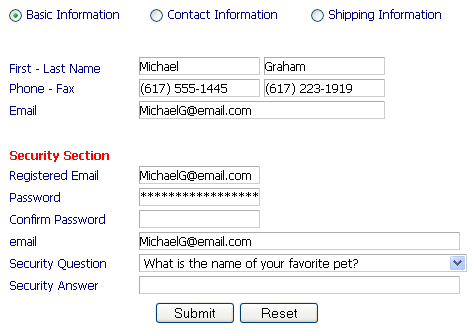
There are four controls that have the control type set to "hidden". These controls are c_customer_id, guid, groups, and ulink. These controls are required and hold values used in the events to find and save the correct records in the tables. The guid control is empty if there is no security record found for the user. All security related controls are then hidden.
The dialog uses simple styles. Each tab uses an image named RowMarkerOn.png when it is selected, and one named RowMarkerOff.png when it is not. Custom images were created for these images in the css folder shopcartSF to simulate a selected radio control for the "on" image, and an unselected radio control for the "off" image.
Containers
CUSTOMER.A5W
Notable Grid Control Property Settings
[Tab Control].1
Property:
Tab Control Properties > Tab properties > Type
Set to "Bands".
[Tab Pane].1
Property:
Tab Pane Properties > Tab label
Set to "Basic Information".
[Tab Pane].2
Property:
Tab Pane Properties > Tab label
Set to "Contact Information".
[Tab Pane].3
Property:
Tab Pane Properties > Tab label
Set to "Shipping Information".
[Merge Cells Begin].3
c_Firstname
Property:
Control Settings > Validation rules
General > Enable rules set to TRUE. General > Require value set to TRUE.
c_Lastname
Property:
Control Settings > Validation rules
General > Enable rules set to TRUE. General > Require value set to TRUE.
[Merge Cells Begin].4
Property:
Merge Cell Properties > Row heading
Set to "Phone - Fax".
c_Email
Property:
Control Settings > Validation rules
General > Enable rules set to TRUE. Text Format > Regular Expression set to "\b[A-Z0-9a-z._%-]+@[A-Z0-9a-z._%-]+\.[A-Za-z]{2,4}\b".
Security Label
Userid
Property:
Control Settings > Show/Hide Expression
guid!=""
Password
Control Settings > Show/Hide Expression
Property:
password!=""
email
Property:
Control Settings > Show/Hide Expression
guid!=""
secques
Property:
Control Settings > Control Type
Set to "Dropdown".
Property:
DropDownBox Properties > Choices
Define Choices > List type is set to "Dynamic". Data Source > Data source type is set to "Variable". Data Source > Variable name is set to "questions".
Property:
Control Settings > Show/Hide Expression
guid!=""
secans
Property:
Control Settings > Show/Hide Expression
guid!=""
[Merge Cells Begin].1
Property:
Merge Cell Properties > Row heading
Set to "City - State -Zip ".
c_Bill_state_region
[Merge Cells Begin].2
Property:
Merge Cell Properties > Row heading
Set to "City - State -Zip".
c_Ship_state_region
Notable Component Property Settings
Layout Options > Layout Calculation Mode
Changed to "Precalculate Layout".
Layout Options > Use simple style
Changed to TRUE.
Dialog Footer Layout > Freeform layout
Changed to TRUE.
Dialog Footer Layout > Dialog footer template
Changed to this:
{SubmitButton}{ResetButton}
Event Code
The Initialize event code finds user records from the customer table and security data and populates the controls. The events starts by setting a default value for the groups control that holds the value of security group for a customer user. The event then sets a logical flag that is TRUE if a customer record is found.
'set default group value to proper guid for 'customers' group
CurrentForm.Controls.groups.value = a5ws_get_guid_from_group("customers",request)
dim FlagFound as l = .F.
If eval_valid("session.protectedpUser.ulink ") = .F. ' NOTE: this is added to eliminate an error message
    dim session.protectedpUser.ulink as c ' Value always exists when run on web page
end if
If the session.protectedpUser.ulink variable has a non-null value, the script uses this value to retrieve the corresponding record from the customer table. The variable will only have a value if someone is logged into the system.
if session.protectedpUser.ulink <> ""
    query.filter = "customer_id = \""+session.protectedpUser.ulink+"\"" ) ' find the record
    query.order = ""
    tbl = table.open("[PathAlias.ADB_Path]\customer.dbf")
    qdx = tbl.query_create()
If the query finds a single record, the script writes the values from the fields of the customer record to the values in the dialog's controls. It begins by getting a list of controls that begin with "c_", which indicate they are fields from the customer table.
if qdx.records_get() = 1 ' have one match
        FlagFound = .T.
        dim controls as c
        controls = properties_enum(CurrentForm.Controls)
        for each foo in controls
            if eval_valid("tbl."+substr(foo,3) )
                if inlist(foo,"c_Phone","c_fax")
                    eval("CurrentForm.Controls."+foo+".value") = transform(remspecial(eval("tbl."+substr(foo,3) ) ),"@R (999) 999-9999")
                else
                    eval("CurrentForm.Controls."+foo+".value") = alltrim(eval("tbl."+substr(foo,3) ) )
                end if
            end if
        next
The event code then re-populates the ulink control with the customer_id from the record found and uses that value to find a security record for the user. The value is placed in a request variable to pass to the ((A5WS_Get_User_Values Function|A5WS_GET_USER_VALUES() )) function.
CurrentForm.Controls.ulink.value = alltrim(tbl.Customer_id)
        tbl.close()
        request.variables.ulink = alltrim(CurrentForm.Controls.ulink.value) 'find security record by 'ulink' as we don't have a 'GUID'
        a5ws_get_user_values(CurrentForm,request)
    else
        tbl.close()
    end if
end if
Finally, the event code then attempts to find a security record from a userid that may have been passed from page. If the validation email control is empty, the userid may be placed in the control as a default value.
if FlagFound = .F. ' no record found in 'customer' table, fill security if found
    a5ws_get_user_values(CurrentForm,request) ' userid should have been passed in request variables.
end if
'set validation email address to same as userid as default if empty
if alltrim(CurrentForm.Controls.userid.value) <> ""
    if alltrim(CurrentForm.Controls.email.value) = ""
        CurrentForm.Controls.email.value = alltrim(CurrentForm.Controls.userid.value)
    end if
end if
The Validate event code validates the security data entered, if any, and saves it if there are no errors. The function ((A5WS_Save_User_Values Function|A5WS_SAVE_USER_VALUES() ))will return CurrentForm.Has_error = .t. if the data does not meet the security validation rules.
a5ws_save_user_values(CurrentForm,request) ' validate and save
The AfterValidate event code starts by setting a Flag variable to designate if this is a new record, and then gets a list of controls on the dialog.
dim FlagNew as l = .T.
dim controls as c
controls = properties_enum(CurrentForm.Controls)
if CurrentForm.Controls.c_customer_id.value <> "" ' indicates existing record (could also use any other known value)
The event code then searches for a customer record that matches the customer_id control. This control would have a value if this is an existing record.
query.filter = "Customer_Id= \""+alltrim(CurrentForm.Controls.c_customer_id.value)+"\""
    query.order = ""
    tbl = table.open("[PathAlias.ADB_Path]\customer.dbf")
    qdx = tbl.query_create()
If the query finds a single record, the script writes the values in the dialog's controls into the fields of the customer record. It sets the flag to FALSE to indicate this is an existing record.
if qdx.records_get() = 1 ' got one
        tbl.change_begin()
        for each foo in controls
            if eval_valid("tbl."+substr(foo,3)) ' field exists in 'customer'
                if inlist(foo,"c_Phone","c_fax") ' phone of fax field, remove formatting
                    eval("tbl."+substr(foo,3) ) = remspecial(eval("CurrentForm.Controls."+foo+".value") )
                else
                    eval("tbl."+substr(foo,3) ) = alltrim(eval("CurrentForm.Controls."+foo+".value") )
                end if
            end if
        next
        tbl.change_end()
        tbl.close()
        FlagNew = .F. ' no need to resave security as 'ulink' was already used to find security record
    end if
end if
If the flag is TRUE, this is a new record and a new record is saved into the customer table. After the record is saved, but before the table is closed, the customer_id value for this new record is saved in a request variable. The security values are re-saved by the ((A5WS_Save_User_Values Function|A5WS_SAVE_USER_VALUES() )) function to add this customer_id value to the security ulink field.
if FlagNew = .T.
    tbl = table.open("[PathAlias.ADB_Path]\customer.dbf")
    tbl.enter_begin()
    for each foo in controls
        if eval_valid("tbl."+substr(foo,3) )
            if inlist(foo,"c_Phone","c_fax")
                eval("tbl."+substr(foo,3) ) = remspecial(eval("CurrentForm.Controls."+foo+".value") )
            else
                eval("tbl."+substr(foo,3) ) = alltrim(eval("CurrentForm.Controls."+foo+".value") )
            end if
        end if
    next
    tbl.enter_end()
    request.variables.ulink = alltrim(tbl.Customer_id) 'get new 'ulink' value
    tbl.close()
    a5ws_save_user_values(CurrentForm,request) ' resave security with new 'ulink' value
end if
The Finally, event code reloads the security values using the function ((A5WS_Get_User_Values Function|A5WS_GET_USER_VALUES() )) to show the latest changes.
a5ws_get_user_values(CurrentForm,request)
The Activate event code populates the states variable using the((CSTATES Function|CSTATES() )) function and the questions variable using the ((A5WS_Get_Security_Ques Function|A5WS_GET_SECURITY_QUES() )) function. These variables are used in the dynamic dropdown controls.
dim states as c
dim questions as c
states = cstates("a"+crlf() )
questions = a5ws_get_security_ques(request)
See Also